
Technical buyer guide
Choose the right Microsoft boundary for the workflow.
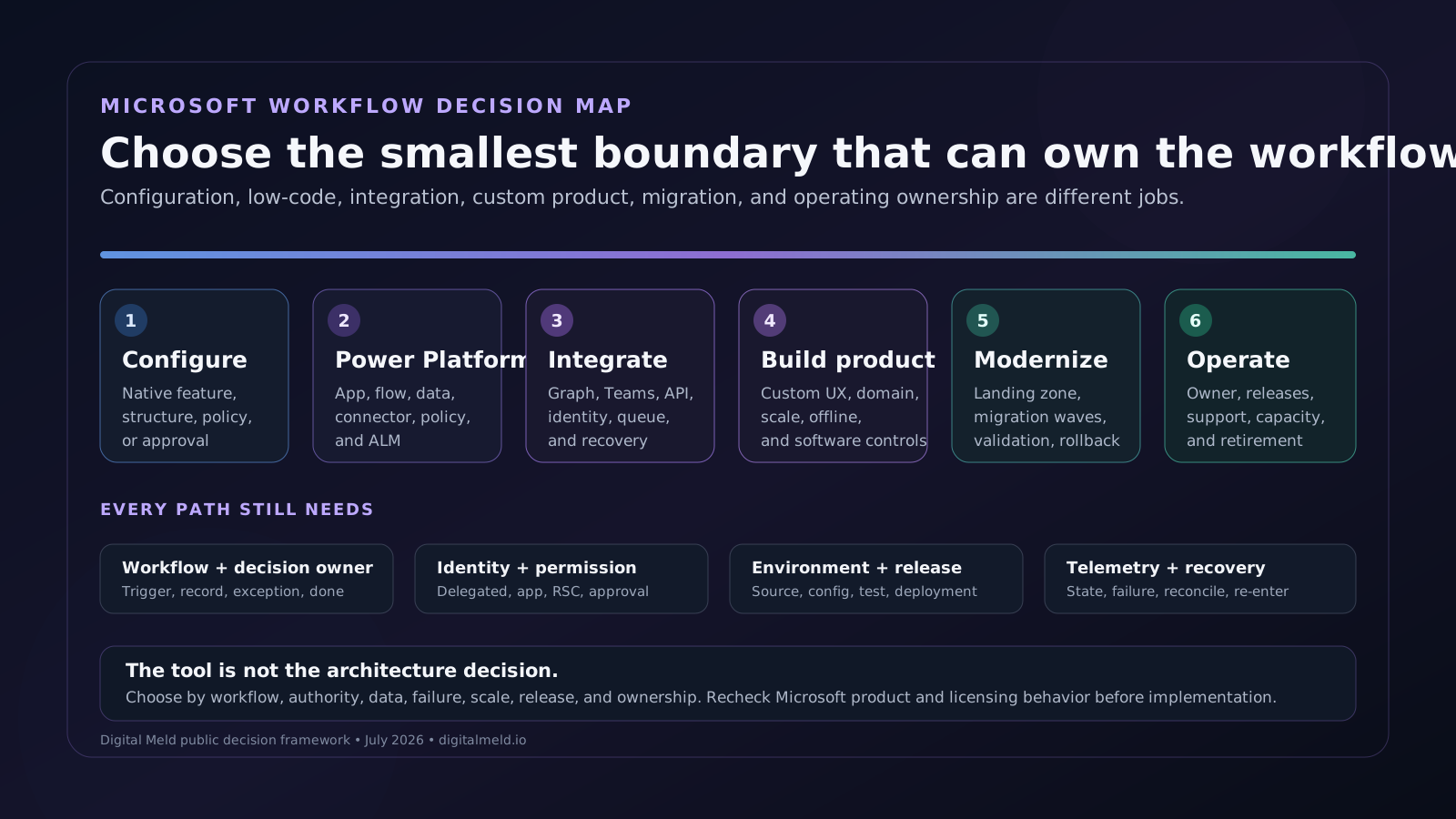
Decide when Microsoft 365 configuration is enough, when Power Platform fits, when Graph or custom engineering is justified, when the platform has to migrate, and who will own it after launch.
Implementation decision
Choose by operating boundary, not product preference.
The smallest supportable path is usually the right starting point. Each step below earns more engineering freedom by accepting more responsibility for permissions, releases, telemetry, recovery, and long-term ownership.
01
Configuration is enough
Use when
The needed state, rule, permission, and user experience already exist in the licensed Microsoft product and no cross-system record has to be synchronized.
What it does not cover
Prefer settings, information architecture, Teams and SharePoint structure, retention, forms, lists, or product-native approval before creating another application.
Proof needed before launch
Record the configuration owner, environment, license dependency, test users, expected behavior, change path, and rollback or disable procedure.
02
Power Platform fits
Use when
An internal workflow has a known owner, supported connectors, manageable data volume, clear approvals, and a user experience that fits Power Apps, Power Automate, Dataverse, or Teams.
What it does not cover
Treat environments, solutions, connection references, identities, data policies, ALM, support, and licensing as part of the product rather than cleanup after the first flow works.
Proof needed before launch
Show the solution package, source-controlled assets, environment variables, connector inventory, policy result, deployment record, tests, owners, and support runbook.
03
Custom integration is justified
Use when
The workflow crosses unsupported or deeply specialized APIs, requires resource-specific Teams behavior, needs durable asynchronous processing, or cannot accept connector and platform limits.
What it does not cover
Choose delegated, application, resource-specific, or human-approved authority explicitly. Keep Graph permissions, downstream authorization, retries, idempotency, throttling, and reconciliation visible.
Proof needed before launch
Publish the API contract, permission inventory, negative authorization tests, failure matrix, action ledger, deployment record, and recovery exercise.
04
A custom application is the product boundary
Use when
The experience needs complex interaction, external users, specialized accessibility, high scale, low latency, offline behavior, background workers, or domain logic that does not fit a low-code host.
What it does not cover
Use Microsoft identity, data, integration, and cloud services where they fit without forcing the entire product into Teams, SharePoint, or Power Platform.
Proof needed before launch
Carry normal software controls: architecture decisions, source, tests, CI/CD, secrets, telemetry, accessibility, security review, data lifecycle, incident ownership, and rollback.
05
Migration or platform modernization is the real work
Use when
Identity, tenants, landing zones, applications, data, interfaces, licensing, or operating ownership must move in waves while old and new environments coexist.
What it does not cover
Separate the destination control plane from workload moves. Define discovery, dependency, wave, data-transfer, validation, rollback, cutover authority, stabilization, and residual ownership.
Proof needed before launch
Use an approved inventory, landing-zone decision, wave plan, rehearsal result, rollback authority, acceptance record, exception register, and handoff runbook.
06
Ongoing ownership is the missing capability
Use when
Apps, flows, integrations, environments, permissions, licenses, incidents, vendors, and backlog decisions exist but no accountable team owns their operating lifecycle.
What it does not cover
Name the service owner, maker and admin roles, support window, release cadence, telemetry, change authority, vendor boundary, capacity plan, and retirement path.
Proof needed before launch
Track service inventory, owners, health, releases, failures, support demand, license/capacity review, access review, change decisions, and decommissioning.
Workflow and integration map
Eight layers keep the tool choice attached to the work.
A Teams app, flow, connector, Graph call, Azure service, or migration wave is only useful when its record, identity, environment, failure state, and owner are explicit.
01
Workflow and decision
Name the trigger, source record, current owner, exception, approval, expected state change, recipient, and definition of done.
02
Systems of record
Decide whether Microsoft 365, Dataverse, Dynamics 365, an ERP, a field system, a data platform, or another application owns each fact and status.
03
User experience
Choose product configuration, Teams, SharePoint, Power Apps, a custom web/mobile interface, or no new interface based on the work and user context.
04
Orchestration
Place stable rules in deterministic automation. Use Power Automate, Logic Apps, Azure services, scheduled jobs, queues, or custom code according to scale and recovery needs.
05
API and data contracts
Version identifiers, schemas, Graph or connector operations, pagination, throttling, concurrency, retry, idempotency, duplicate, and reconciliation behavior.
06
Identity and permission
Choose delegated, application, resource-specific, managed, or human-approved authority with least privilege, consent, token audience, and revocation.
07
Environment and release
Separate development, test, and production; carry solutions or deployable source through reviewable ALM with environment-specific configuration and secrets.
08
Operate and recover
Monitor workflow state, dependency health, permission failures, throughput, cost, owner action, support demand, rollback, compensation, and controlled re-entry.
Trust and governance
The governance work changes with the implementation path.
Product behavior, licensing, permission types, connector policy, and cloud guidance change. Confirm the exact tenant and product boundary during scope and again before release.
Product and license fit is current
Confirm the intended feature, connector, environment, Dataverse, Copilot, Managed Environments, capacity, and user rights against the current Microsoft licensing terms before scope approval.
Permission scope matches the workflow
Document Graph delegated versus application access, Teams resource-specific consent where supported, admin consent, service identities, Conditional Access, downstream authorization, and revocation.
Connector and endpoint policy is enforceable
Test the exact environment, connector, action, custom connector or HTTP endpoint against current Power Platform data policies; do not infer support across policy generations.
ALM does not live only in an environment
Keep deployable solution assets and custom code in source control, separate environment configuration, verify dependency ordering, and record the production deployment and rollback path.
Migration waves can stop and recover
Set entry, rehearsal, validation, go/no-go, rollback authority, communications, exception, stabilization, and acceptance criteria for each wave.
An owner remains after launch
Assign the service, identity, environment, connection, license/capacity, release, incident, data lifecycle, vendor, and retirement responsibilities.
Approved migration proof
Enterprise divestiture and Microsoft cloud migration.
The public case shows how infrastructure separation, a greenfield Azure control plane, Microsoft 365, application and data moves, rollback planning, TSA exit, and operating handoff fit one transition sequence.
Separating infrastructure and Microsoft cloud during an enterprise divestiture
A technology carve-out sequenced across identity, infrastructure, Microsoft 365, Azure, applications, data, TSA exit, and steady-state ownership.
Publication note: Anonymized founder delivery experience from before Digital Meld. The client is not named, confidential operating details are excluded, and no client endorsement is implied.
Inspect the case and measurement limitsCarve-out operating sequence
An anonymized four-phase view of the work from separation boundary through destination controls, migration waves, and operating handoff.
View public sourceCurrent Microsoft sources
Verify product behavior at the implementation boundary.
These Microsoft sources support the permission, Teams, Power Platform, identity, migration, and licensing decisions on this page. Product status and licensing must be rechecked for the tenant and release date.
Microsoft Graph permissions overview
Delegated access acts on behalf of a signed-in user; app-only access uses the application identity. The workflow must choose and consent to the appropriate permission type.
Microsoft Teams apps permissions and consent
Teams resource-specific consent can limit an app to a specific team, chat, meeting, or user resource instead of org-wide access where the relevant permission supports it.
Microsoft Entra Conditional Access overview
Current identity-driven policy signals, grant/block decisions, product and license boundaries, report-only visibility, and deployment planning considerations.
Power Platform ALM
Current solutions, environment strategy, source and packaging tools, pipelines, GitHub/Azure DevOps automation, and healthy ALM scenarios.
Power Platform data policies
Current connector, connection, environment, policy-evaluation, suspension/quarantine, runtime failure, and enforcement-latency behavior.
Power Platform advanced connector policies
Current default-deny and action-level policy behavior plus documented connector-type and rollout limitations that must be rechecked for each implementation.
Power Platform custom connector connection parameters
Supported authentication types and the current limitation that custom connectors do not support the client-credentials grant type.
Cloud Adoption Framework for Microsoft
Current Strategy, Plan, Ready, Migrate, Modernize, Govern, Secure, and Manage guidance for Azure adoption.
Cloud Adoption Framework migration planning
Current guidance for sequencing, hybrid dependencies, data transfer, success criteria, formal approval, and rollback authority.
Transition a brownfield Azure environment
A current phased approach that establishes a parallel landing-zone structure, assesses policy in audit-only mode, and moves workloads after teams satisfy the target controls.
Managed Environments licensing
Current entitlements and user licensing considerations for apps and flows operating in Managed Environments; exact scope must be checked at proposal and renewal time.
Related Microsoft work
Keep the architecture connected to real implementation context.
The adjacent decision framework for agent identity, tool permissions, traces, evaluations, cost controls, and incident recovery.
The transaction workflow for discovery, Day-1 continuity, TSA exit, separation, integration, and ownership transfer.
A current architecture discussion across Microsoft identity, collaboration, cloud, and agent control planes.
Public Microsoft ecosystem and open-source implementation context from Microsoft Build 2026.
An existing example of connecting financial and program-management workflows to Teams, SharePoint, Power Automate, and Power BI.
Next implementation decision
Scope the boundary, then build or transform.
Bring the workflow, systems, authority, data, scale, release constraint, and current failure. We will identify whether configuration, Power Platform, integration, custom engineering, migration, or ongoing ownership is the real need.
- Use Build when the workflow and owners are known and the main work is implementation.
- Use Transform when identity, tenants, cloud, applications, data, vendors, or operating ownership must move together.